Enhancing meal planning and shopping
Eatsy streamlines recipe discovery, weekly planning, and grocery shopping through user-tested flows.
Eatsy streamlines recipe discovery, weekly planning, and grocery shopping through user-tested flows.
Type
App design
Maker space
Role
Visual design
Wireframing
Prototyping
Usability testing
Tools
Figma
Miro
Team
5 Members (initially)
Overview
As a team, we were tasked to tackle a problem that we thought was prevalent in our lives. We decided to address student's issues when planning meals daily. However, upon completing the final product I found myself to be unsatisfied with the level of user testing and visual design. Determined to enhance its effectiveness, I decided to redesign key aspects of the app and conduct thorough user testing.
Problem statement
How might we develop an intuitive and accessible system to aid time-pressed university students with limited resources in effectively planning and preparing their meals?
USER RESEARCH INSIGHTS
Gathering insights from university students regarding their current meal planning methods
🤔 Key insight #1
80% of survey participants face uncertainty when deciding what to cook for a week's worth of meals
🛒 Key insight #2
70% of survey participants often purchase too much or too little of an ingredient when grocery shopping.
🍱 Key insight #3
90% of survey participants indicated an interest in exploring different cuisines
USER PERSONA
Getting a better picture of our users
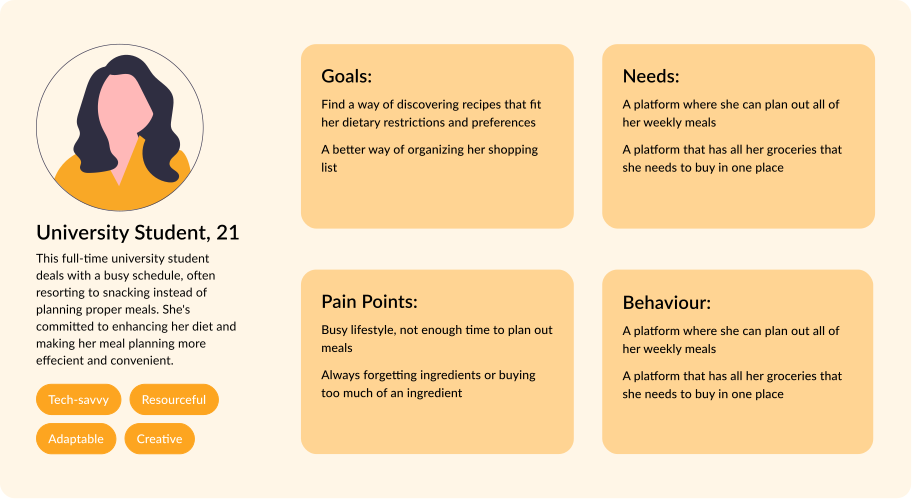
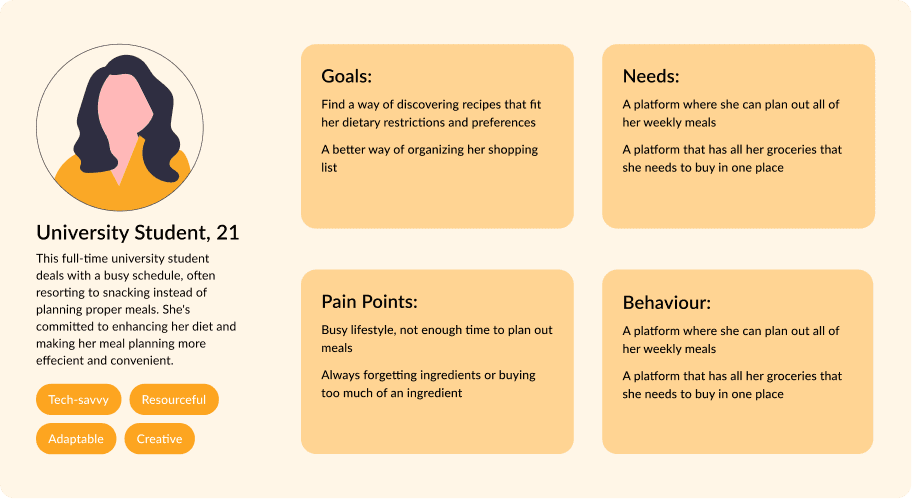
After compiling key insights I created a user persona based on the goals, needs and points I observed in the survey results.
WIREFRAMES
Brain-dumping ideas that address user needs and pain points
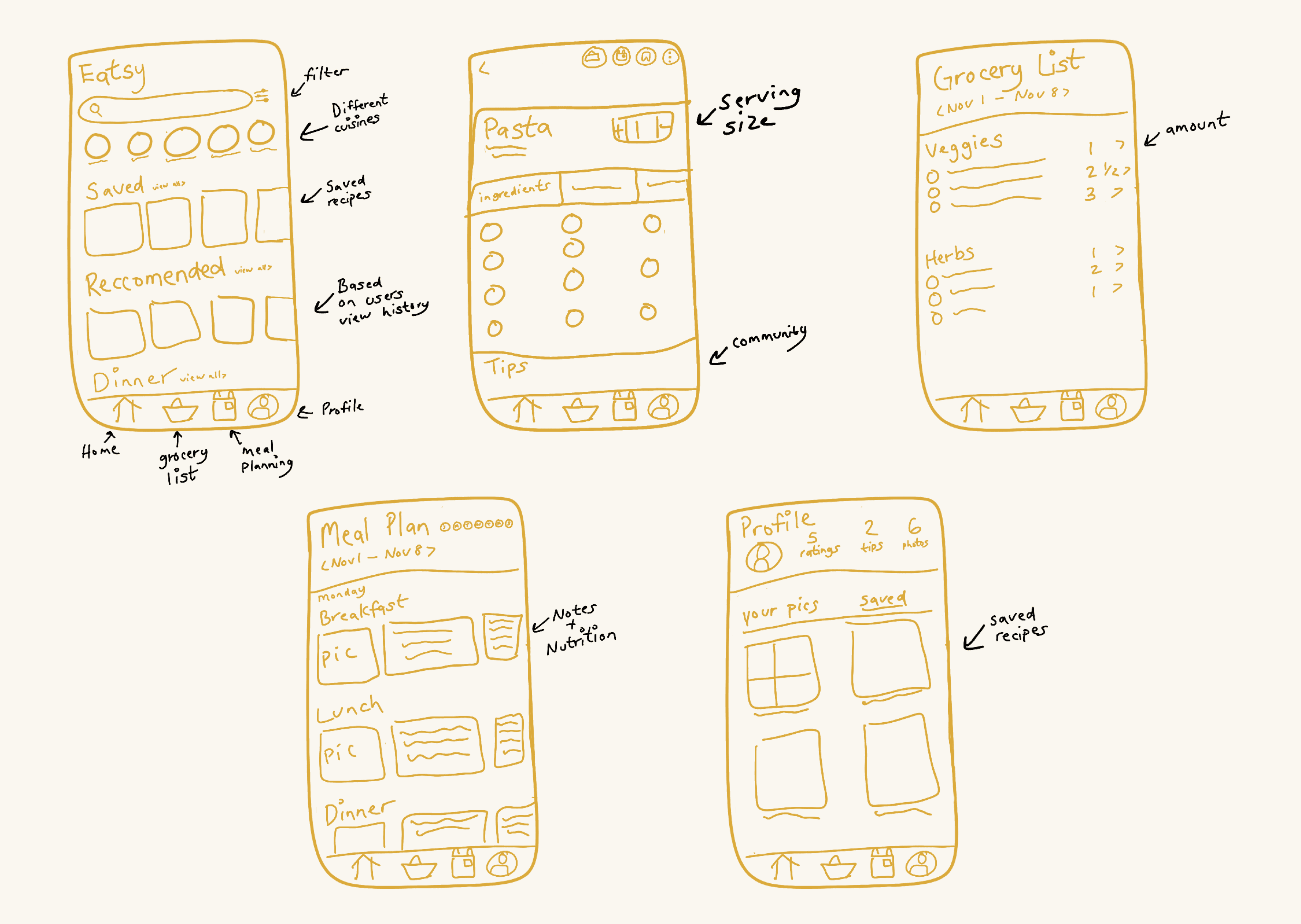
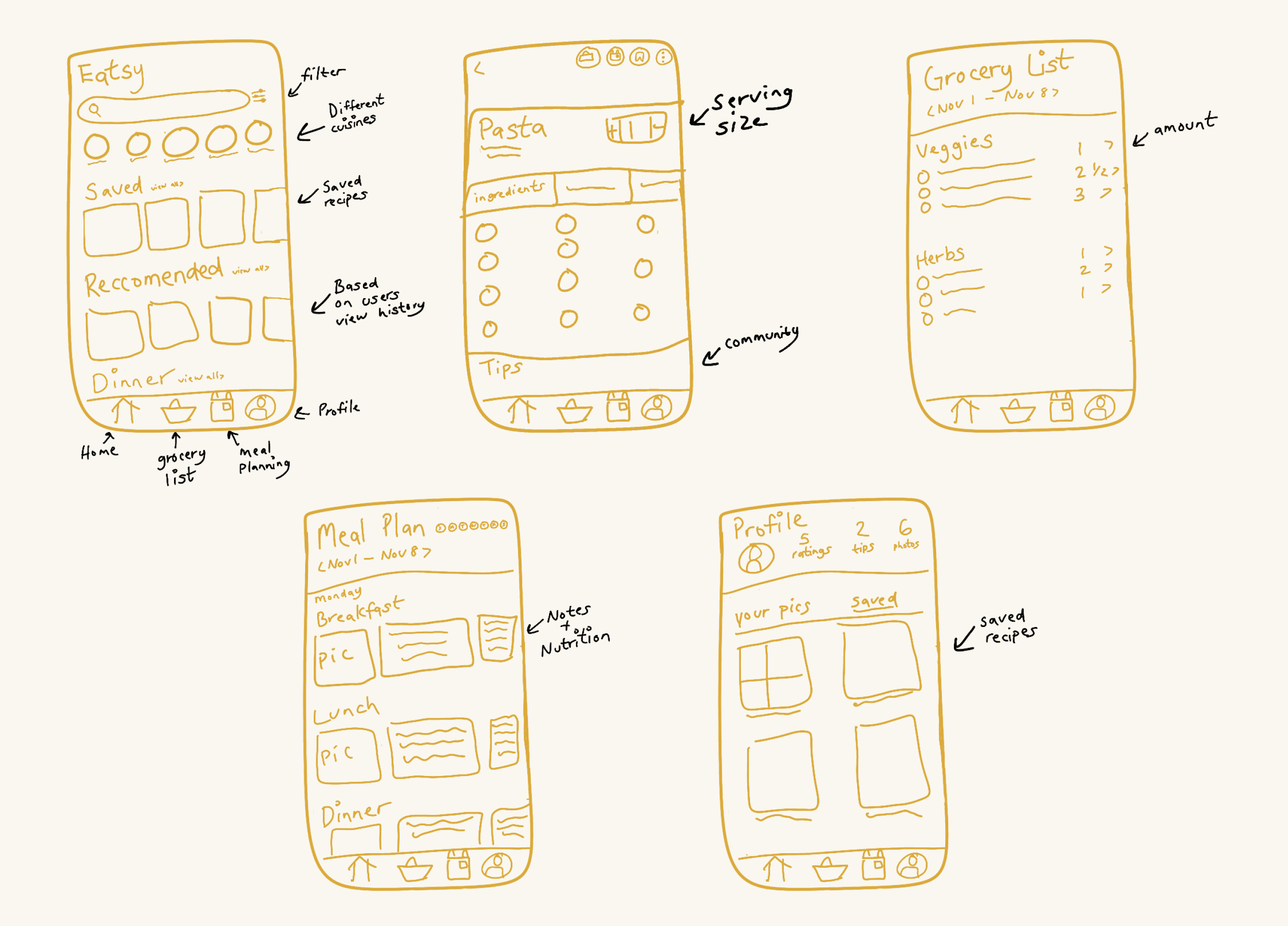
After getting a good idea of our target users goals, needs, and pain points, we went ahead and began to brain dump and create some wireframes.
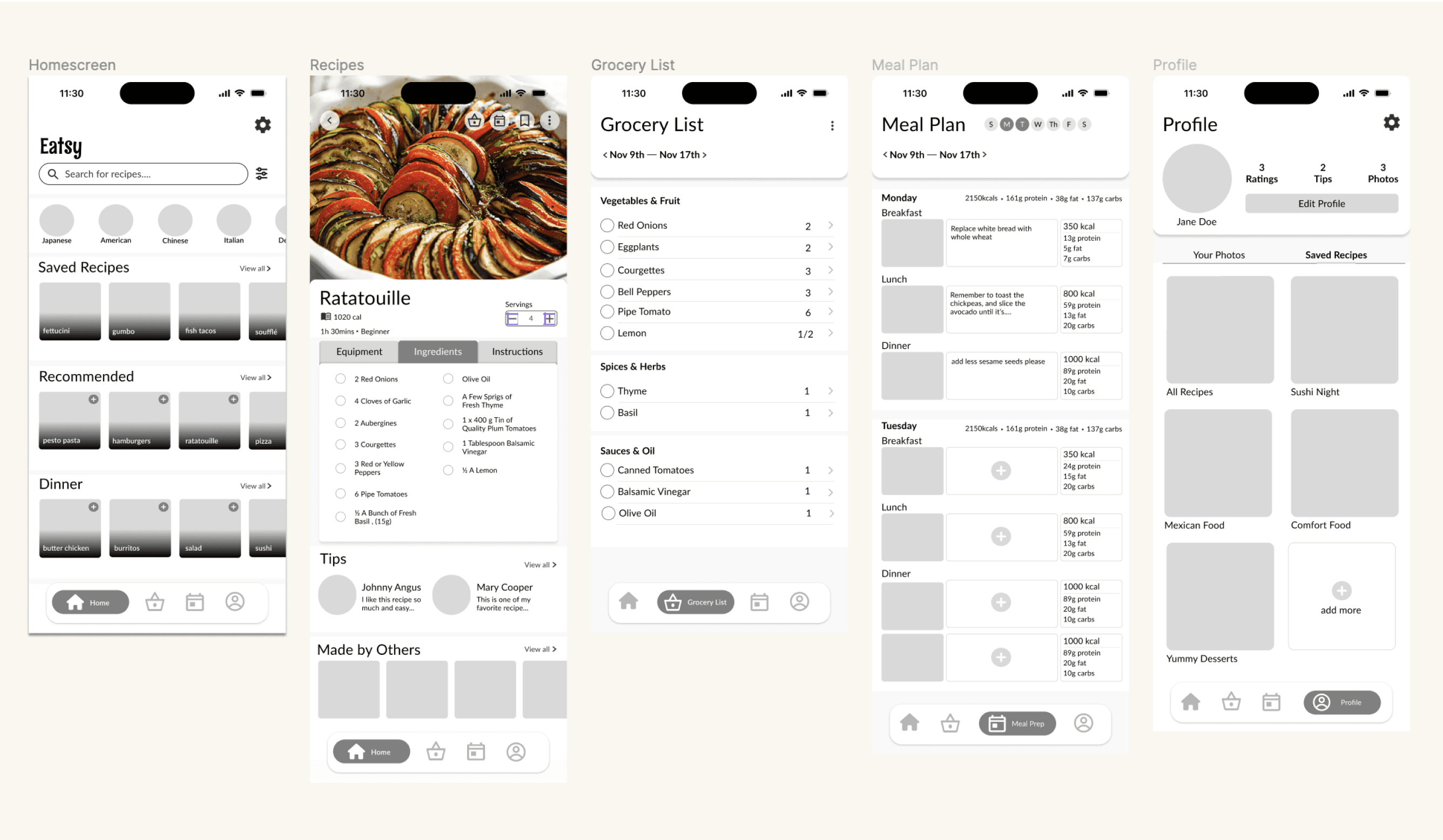
MID FIDELITY MODEL
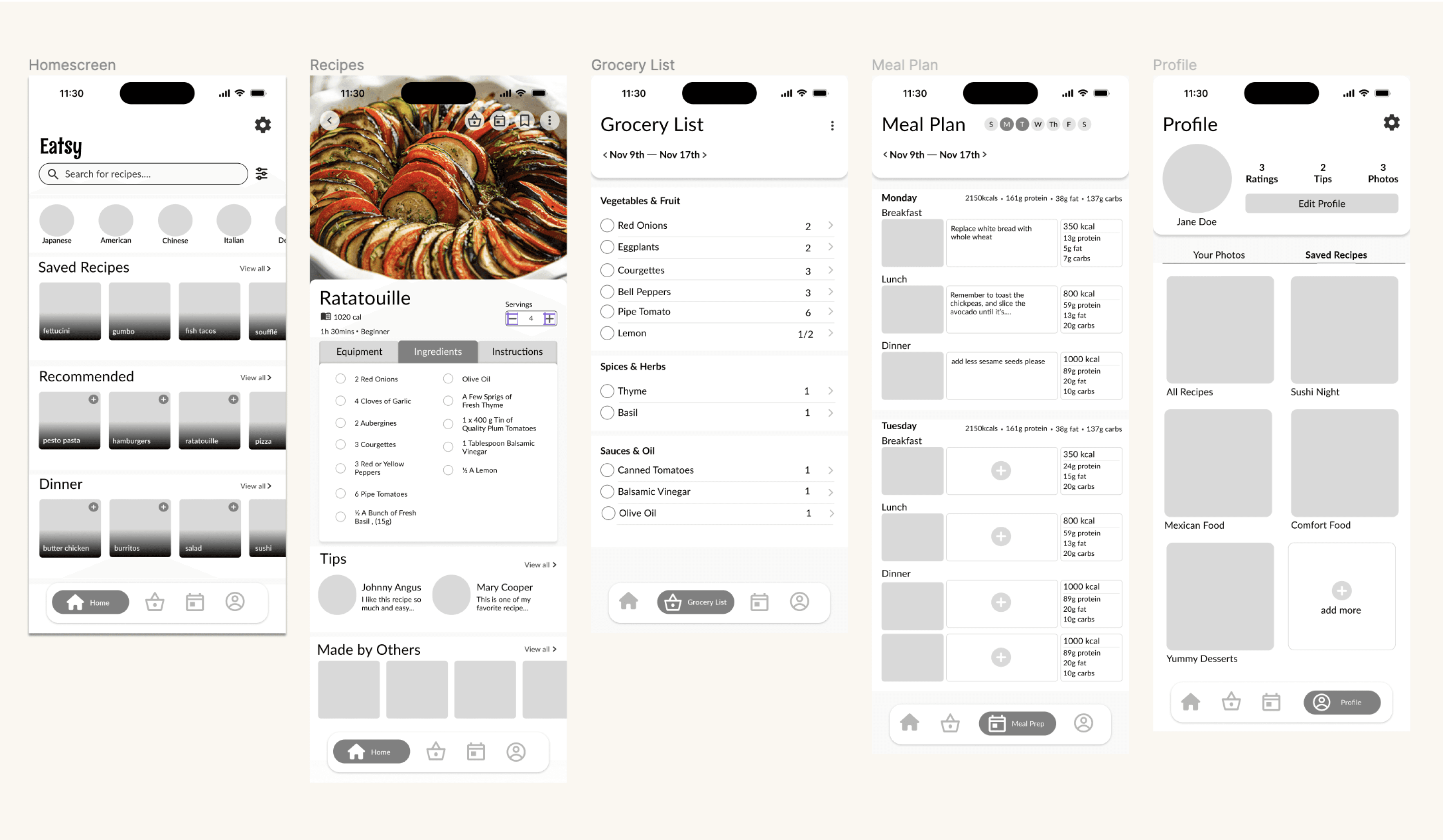
Kicking it up to mid fidelity
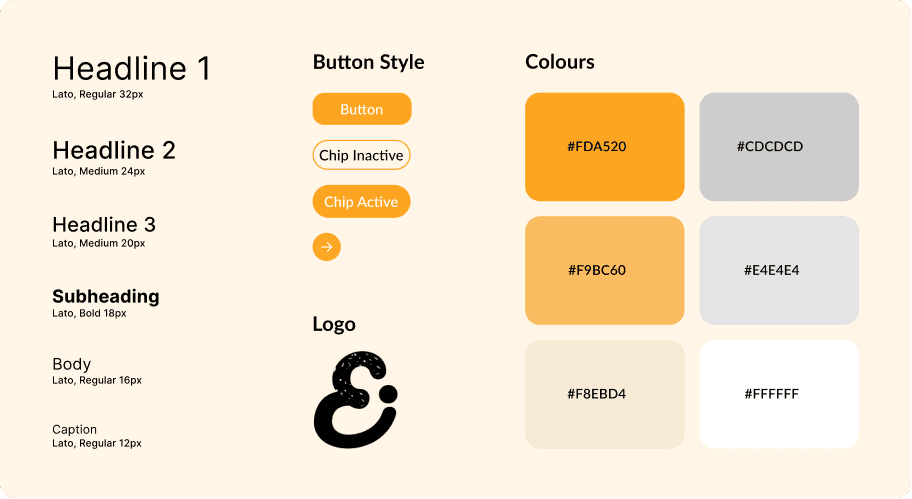
VISUAL DESIGN SYSTEM
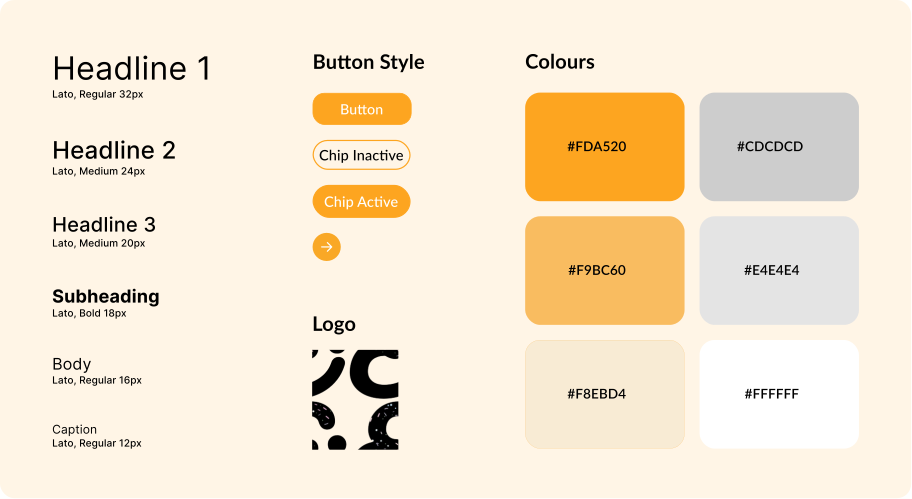
Creating a cohesive design system
USABILITY TESTING
Testing our mid fidelity model based on customer segmentation
To test the effectiveness of our app, I conducted usability testing on an adult, university student and a high schooler. I asked them the following questions:
If you were looking to find recipes based on your preference where would you expect to find it?
How was your experience of adding a recipe to your meal plan?
Why did you do X or Z?
What are your thoughts of on your overall experience in the app?
What were some things you liked and disliked?
Things Users Liked:
👍 Being able to see total macro nutrients in weekly meal plan
👍 The tip section on recipes
👍 The meal make user feel organized
Things Users Disliked:
👎 The navigation bar was confusing
👎 The buttons on the top of the recipe page were hard to find
ITERATIONS
Iterating on screen layouts to make them more accessible and intuitive
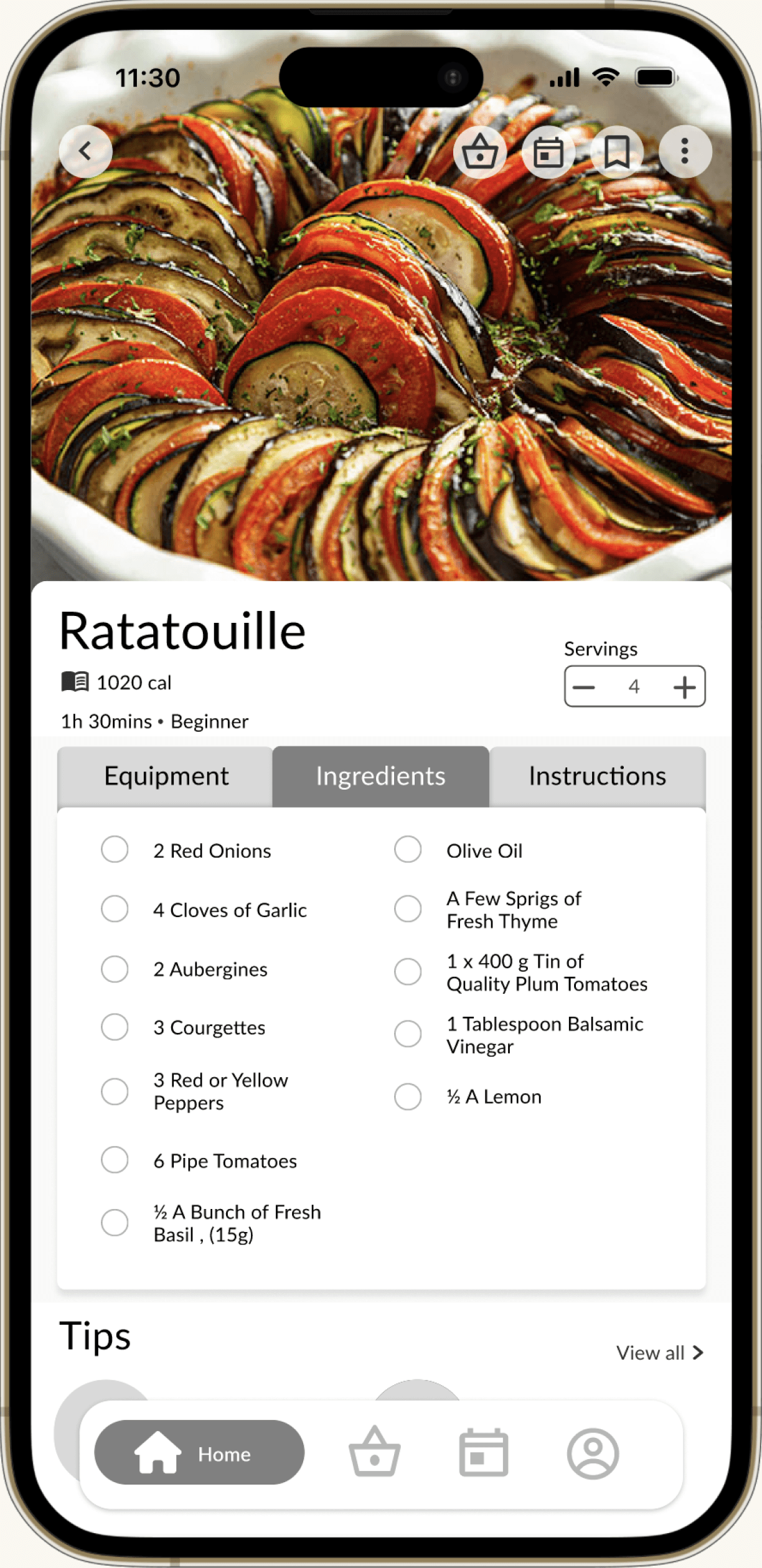
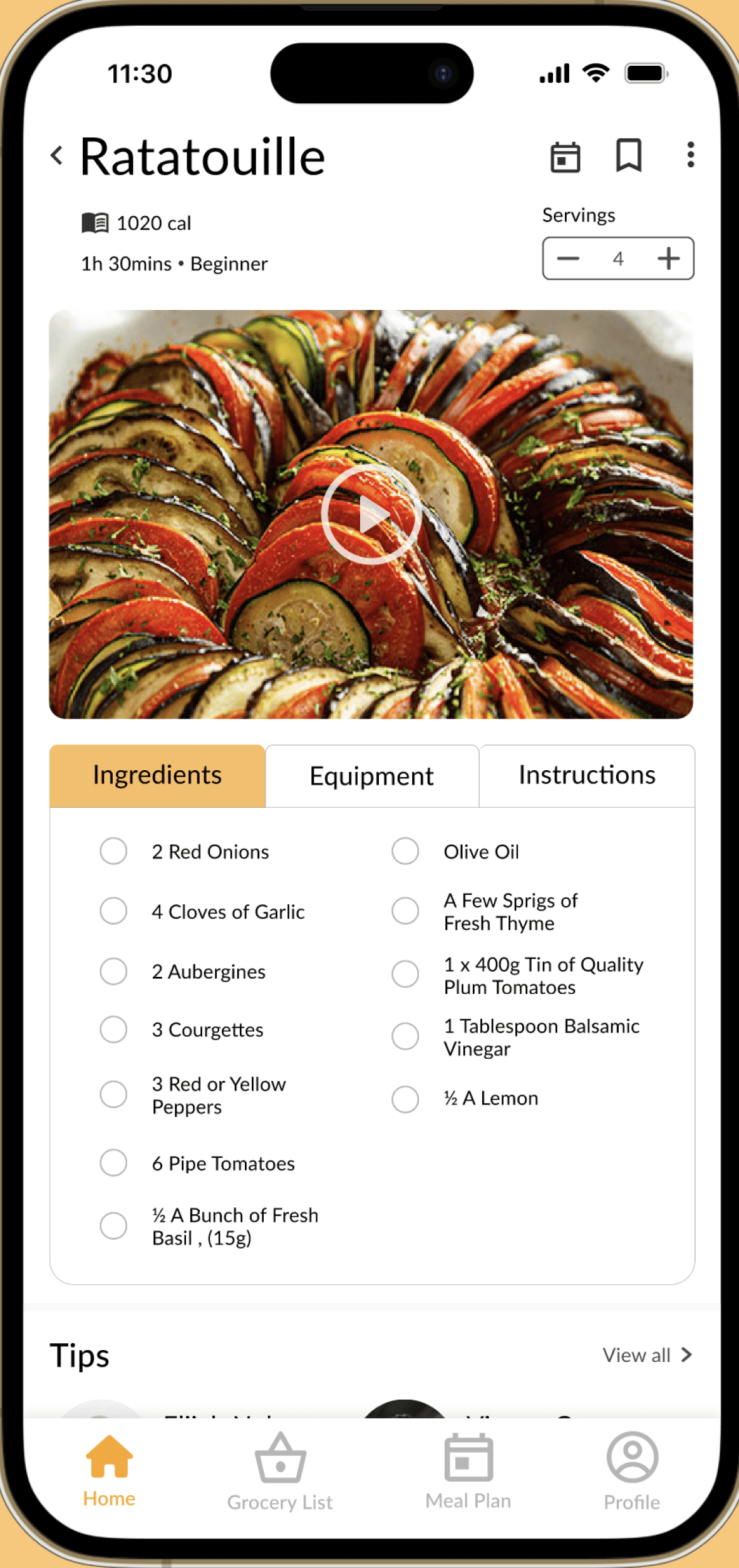
Taking into account the insights and feedback received in the usability tests I decided to redesign the navigation bar and the recipe page as those elements were creating the most confusion.
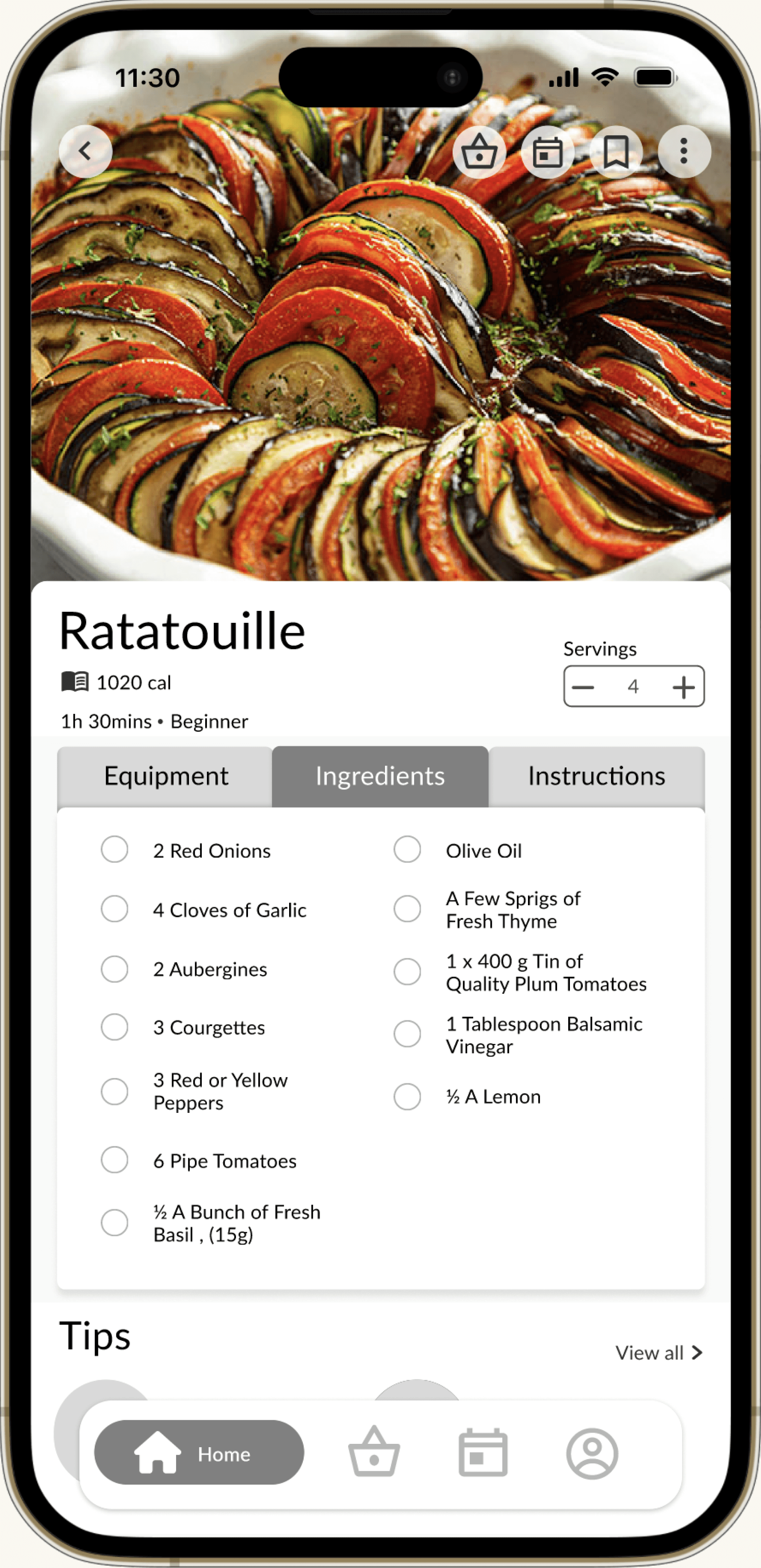
BEFORE
❌ recipe buttons are hard to see with the picture of the dish in the background
❌ The navigation bar was not intuitive with older users.
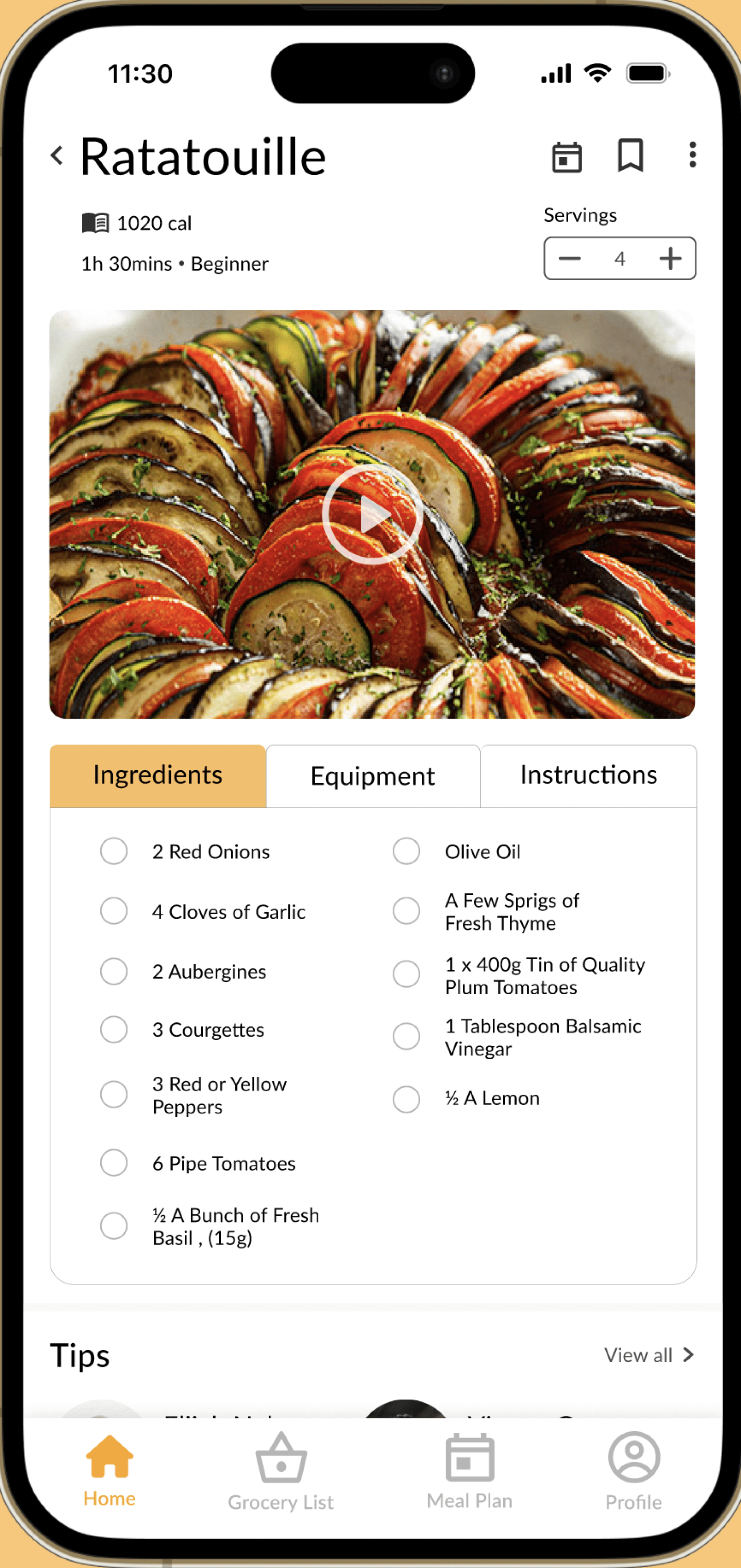
AFTER
✅ Recipe buttons are clear to see
✅ Navigation bar has labels for ease of use
✅ Primary info is easily scannable
FINAL DESIGNS
Final Design and fun features :)
Onboarding
Allows first-time users to understand how to use the app, ensuring a smooth introduction to maximize their knowledge and satisfaction.
Discover recipes
Users can search and find meals based on their personal preferences. With advanced filtering, users can successfully find recipes based on their circumstances, whether they have a dietary preference or need a quick 15-minute meal.
Save recipes
Easily save recipes for later and schedule them for specific meals. Users can also see tips and pictures from other users who have already made the meal.
Automated grocery lists
Easily shop with your grocery list categorized by ingredients type for convenience. Users can effortlessly manage their grocery lists by managing their meal plan ensuring a smooth and efficient shopping process.
Meal plan
Users can effortlessly schedule their meals by the week, complete with note-taking capabilities and conveniently displayed nutrition facts.
Saved recipes & photos
Easily save your recipes by categorizing them to your hearts desire. Users can also track their journey as a chef by uploading their culinary creations!
TAKEAWAYS
What I learned along the way
🗝️ User testing is key
Understanding that not everyone shares my perspective underscores the significance of user testing. It was really interesting observing how other people would interact with the app, it puts into perspective how different everyone thinks.
📲 Embrace iteration
Redesigning certain pages post-usability testing was both challenging and rewarding. While it felt a little tedious at times, witnessing the final product satisfying the user made it all worthwhile.
📢 Communication is crucial
During the initial iteration of our app, team communication was lacking. I believe thats why the original app design didn't turn out well. Ensuring everyone is aligned on the design process is crucial.
Overview
As a team, we were tasked to tackle a problem that we thought was prevalent in our lives. We decided to address student's issues when planning meals daily. However, upon completing the final product I found myself to be unsatisfied with the level of user testing and visual design. Determined to enhance its effectiveness, I decided to redesign key aspects of the app and conduct thorough user testing.
Type
App design
Maker space
Role
Visual design
Wireframing
Prototyping
Usability testing
Tools
Figma
Miro
Team
5 Members (initially)
View the final Figma prototype
How might we develop an intuitive and accessible system to aid time-pressed university students with limited resources in effectively planning and preparing their meals?
Problem statement
USER RESEARCH INSIGHTS
Gathering insights from university students regarding their current meal planning methods
🤔 Key insight #1
80% of survey participants face uncertainty when deciding what to cook for a week's worth of meals
🛒 Key insight #2
70% of survey participants often purchase too much or too little of an ingredient when grocery shopping.
🍱 Key insight #3
90% of survey participants indicated an interest in exploring different cuisines
USER PERSONA
Getting a better picture of our users
After compiling key insights I created a user persona based on the goals, needs and points I observed in the survey results.
WIREFRAMES
Brain-dumping ideas that address user needs and pain points
After getting a good idea of our target users goals, needs, and pain points, we went ahead and began to brain dump and create some wireframes.
MID FIDELITY MODEL
Kicking it up to mid fidelity
USABILITY TESTING
Testing our mid fidelity model based on customer segmentation
To test the effectiveness of our app, I conducted usability testing on an adult, university student and a high schooler. I asked them the following questions:
If you were looking to find recipes based on your preference where would you expect to find it?
How was your experience of adding a recipe to your meal plan?
Why did you do X or Z?
What are your thoughts of on your overall experience in the app?
What were some things you liked and disliked?
Things Users Disliked:
👎 The navigation bar was confusing
👎 The buttons on the top of the recipe page were hard to find
Things Users Liked:
👍 Being able to see total macro nutrients in weekly meal plan
👍 The tip section on recipes
👍 The meal make user feel organized
VISUAL DESIGN SYSTEM
Creating a cohesive design system
ITERATIONS
Iterating on screen layouts to make them more accessible and intuitive
Taking into account the insights and feedback received in the usability tests I decided to redesign the navigation bar and the recipe page as those elements were creating the most confusion.
BEFORE
❌ recipe buttons are hard to see with the
picture of the dish in the background
❌ The navigation bar was not intuitive with
older users.
AFTER
✅ Recipe buttons are clear to see
✅ Navigation bar has labels for ease of use
✅ Primary info is easily scannable
FINAL DESIGNS
Final design and fun features :)
Onboarding
Allows first-time users to understand how to use the app, ensuring a smooth introduction to maximize their knowledge and satisfaction.
Discover recipes
Users can search and find meals based on their personal preferences. With advanced filtering, users can successfully find recipes based on their circumstances, whether they have a dietary preference or need a quick 15-minute meal.
Save recipes
Easily save recipes for later and schedule them for specific meals. Users can also see tips and pictures from other users who have already made the meal.
Automated grocery lists
Easily shop with your grocery list categorized by ingredients type for convenience. Users can effortlessly manage their grocery lists by managing their meal plan ensuring a smooth and efficient shopping process.
Meal plan
Users can effortlessly schedule their meals by the week, complete with note-taking capabilities and conveniently displayed nutrition facts.
Saved recipes & photos
Easily save your recipes by categorizing them to your hearts desire. Users can also track their journey as a chef by uploading their culinary creations!
TAKEAWAYS
What I learned along the way
🗝️ User testing is key
Understanding that not everyone shares my perspective underscores the significance of user testing. It was really interesting observing how other people would interact with the app, it puts into perspective how different everyone thinks.
📲 Embrace iteration
Redesigning certain pages post-usability testing was both challenging and rewarding. While it felt a little tedious at times, witnessing the final product satisfying the user made it all worthwhile.
📢 Communication is crucial
During the initial iteration of our app, team communication was lacking. I believe thats why the original app design didn't turn out well. Ensuring everyone is aligned on the design process is crucial.
Overview
As a team, we were tasked to tackle a problem that we thought was prevalent in our lives. We decided to address student's issues when planning meals daily. However, upon completing the final product I found myself to be unsatisfied with the level of user testing and visual design. Determined to enhance its effectiveness, I decided to redesign key aspects of the app and conduct thorough user testing.
Type
App Design
Maker Space
Role
Visual Design
Wireframing
Prototyping
Usability Testing
Team
5 Members
(initially)
Tools
Figma
Miro
View the final Figma prototype
Problem statement
How might we develop an intuitive and accessible system to aid time-pressed university students with limited resources in effectively planning and preparing their meals?
USER RESEARCH INSIGHTS
Gathering insights from university students regarding their current meal planning methods
🤔 Key insight #1
80% of survey participants face uncertainty when deciding what to cook for a week's worth of meals
🛒 Key insight #2
70% of survey participants often purchase too much or too little of an ingredient when grocery shopping.
🍱 Key insight #3
90% of survey participants indicated an interest in exploring different cuisines
WIREFRAMES
Brain dumping ideas that address user needs and pain points
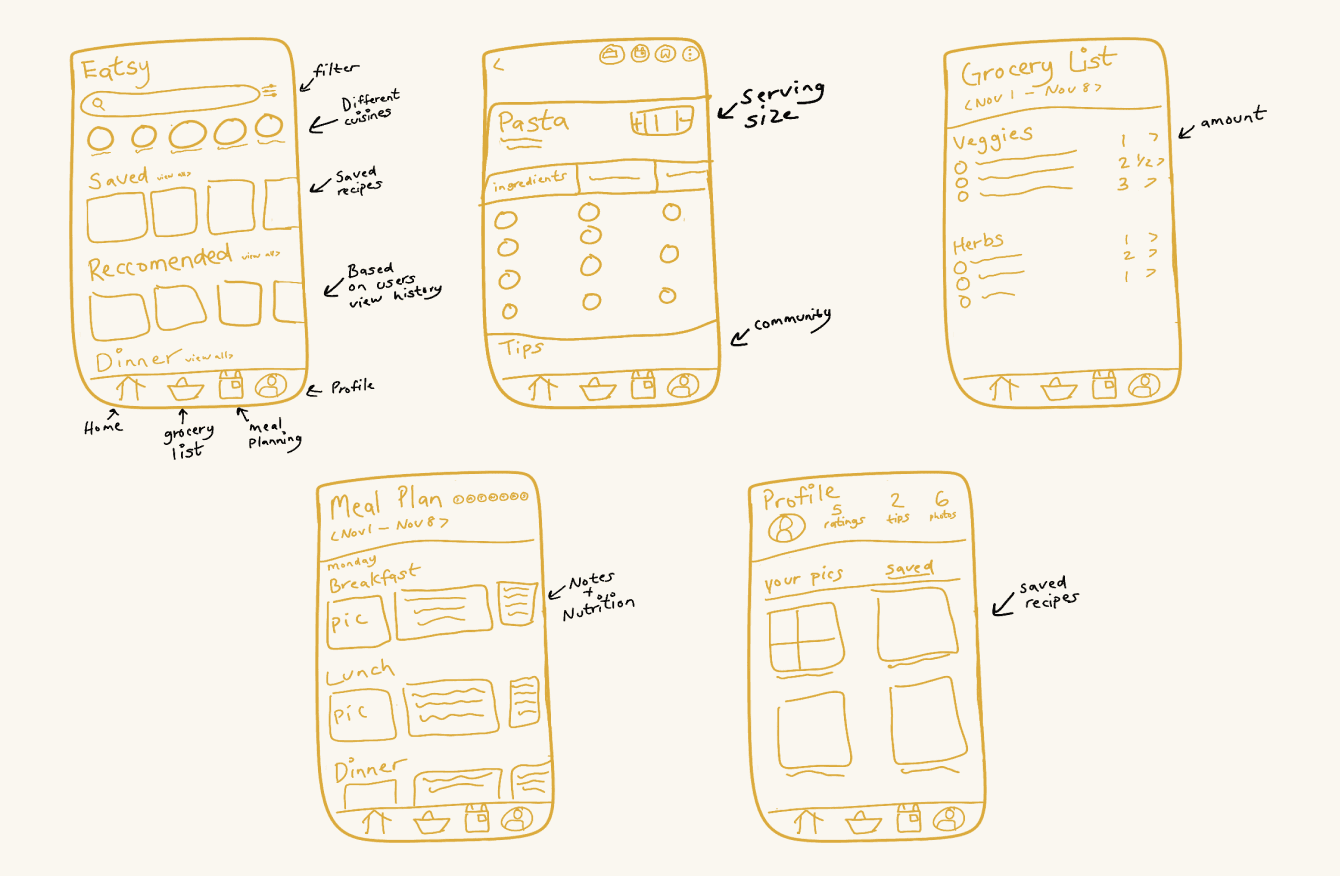
After getting a good idea of our target users goals, needs, and pain points, we went ahead and began to brain dump and create some wireframes.
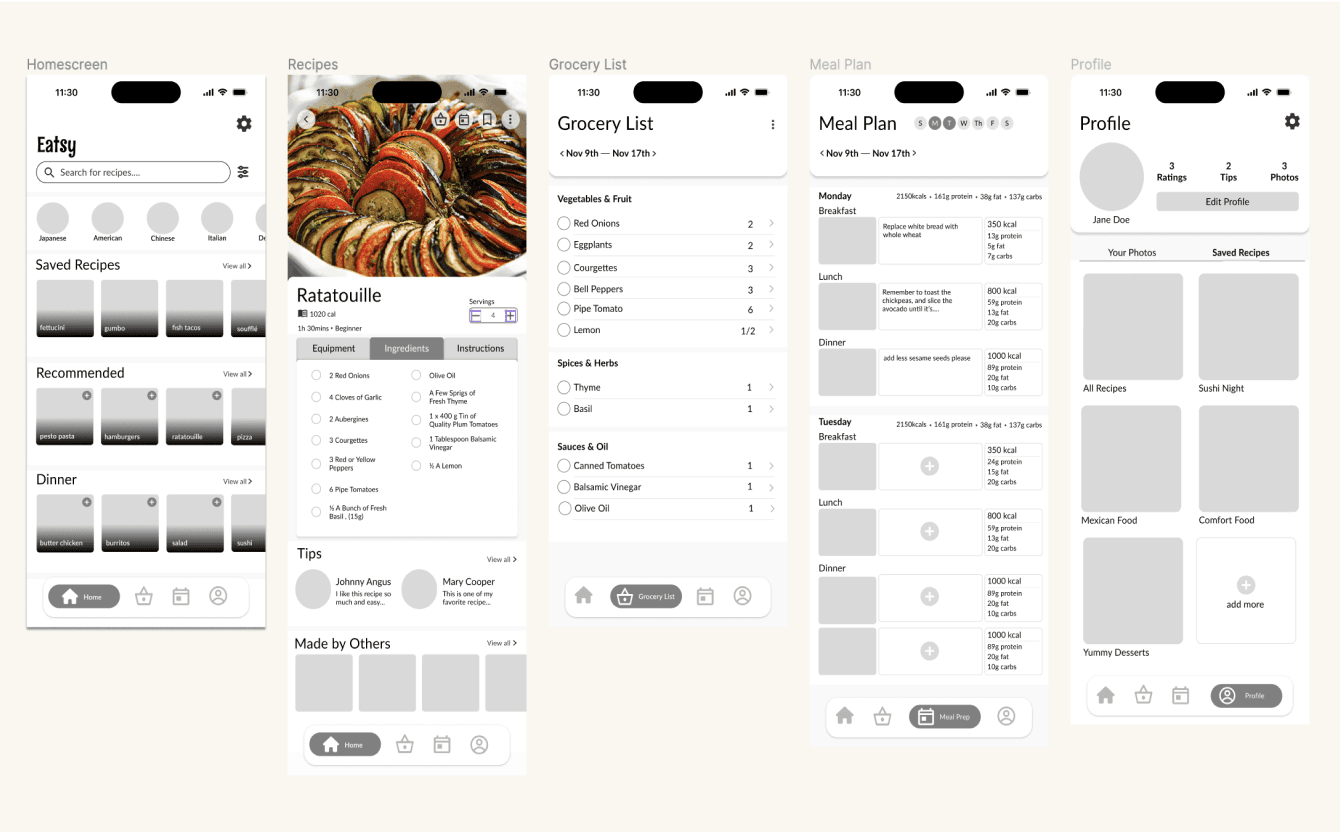
MID FIDELITY MODEL
Kicking it up to mid fidelity
USER PERSONA
Getting a better picture of our users
After compiling key insights I created a user persona based on the goals, needs and points I observed in the survey results.
USABILITY TESTING
Testing our mid fidelity model based on customer segmentation
To test the effectiveness of our app, I conducted usability testing on an adult, university student and a high schooler. I asked them the following questions:
If you were looking to find recipes based on your preference where would you expect to find it?
How was your experience of adding a recipe to your meal plan?
Why did you do X or Z?
What are your thoughts of on your overall experience in the app?
What were some things you liked and disliked?
Things Users Disliked:
👎 The navigation bar was confusing
👎 The buttons on the top of the recipe page were hard to find
Things Users Liked:
👍 Being able to see total
macro nutrients in weekly
meal plan
👍 The tip section on recipes
👍 The meal make user feel
organized
VISUAL DESIGN SYSTEM
Creating a cohesive design system
ITERATIONS
Iterating on screen layouts to make them more accessible and intuitive
Taking into account the insights and feedback received in the usability tests I decided to redesign the navigation bar and the recipe page as those elements were creating the most confusion.
BEFORE
❌ recipe buttons are hard to
see with the picture of the
dish in the background
❌ The navigation bar was not
intuitive with older users.
AFTER
✅ Recipe buttons are clear to see
✅ Navigation bar has labels for ease of use
✅ Primary info is easily scannable
FINAL DESIGNS
Final design and fun features :)
Onboarding
Allows first-time users to understand how to use the app, ensuring a smooth introduction to maximize their knowledge and satisfaction.
Discover recipes
Users can search and find meals based on their personal preferences. With advanced filtering, users can successfully find recipes based on their circumstances, whether they have a dietary preference or need a quick 15-minute meal.
Save recipes
Easily save recipes for later and schedule them for specific meals. Users can also see tips and pictures from other users who have already made the meal.
Automated grocery lists
Easily shop with your grocery list categorized by ingredients type for convenience. Users can effortlessly manage their grocery lists by managing their meal plan ensuring a smooth and efficient shopping process.
Meal plan
Users can effortlessly schedule their meals by the week, complete with note-taking capabilities and conveniently displayed nutrition facts.
Saved recipes & photos
Easily save your recipes by categorizing them to your hearts desire. Users can also track their journey as a chef by uploading their culinary creations!
TAKEAWAYS
What I learned along the way
🗝️ User testing is key
Understanding that not everyone shares my perspective underscores the significance of user testing. It was really interesting observing how other people would interact with the app, it puts into perspective how different everyone thinks.
📲 Embrace iteration
Redesigning certain pages post-usability testing was both challenging and rewarding. While it felt a little tedious at times, witnessing the final product satisfying the user made it all worthwhile.
📢 Communication is crucial
During the initial iteration of our app, team communication was lacking. I believe thats why the original app design didn't turn out well. Ensuring everyone is aligned on the design process is crucial.